- Dynamo
Dynamo-Create new mulit sheets from excel (for Revit 20 : 26)
- $5.00
- Add to cart
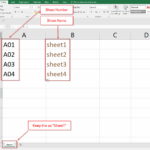
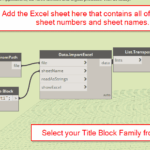
- Create multiple Revit sheets from Excel with Dynamo.Use Sheet1 with Column A = Sheet Number and Column B = Sheet Name, choose a Title Block, and generate sheets automatically.
- Dynamo
Dynamo-Replace any value in sheet name (for Revit 20 : 26)
- $5.00
- Add to cart
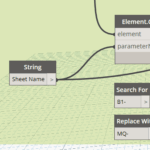
- Bulk replace text in Revit Sheet Names with Dynamo. Search and replace words, prefixes, or phrases across all sheets automatically.
- Dynamo
Dynamo-Replace any value in sheet number (for Revit 20 : 26)
- $5.00
- Add to cart
- Easily replace any text in Revit sheet numbers with Dynamo. Search and replace in bulk to save time and keep numbering consistent.
- Dynamo
Dynamo-Change the Room Name to UPPERCASE (for Revit 20 : 26)
- $5.00
- Add to cart
- Convert all Revit room names to uppercase with Dynamo. Standardize naming instantly across your project.
- Dynamo
Dynamo-Apply Sheet Issue Revision to multiple sheets (for Revit 20 : 22)
- $5.00
- Add to cart
- Apply a revision to multiple Revit sheets with Dynamo. Just enter the revision sequence number and update all sheets in seconds.
- Dynamo
Dynamo-Purge Unused Views (for Revit 20 : 22)
- $5.00
- Add to cart
- Clean your Revit file in minutes. This Dynamo tool finds views you’re not using and lets you tick the ones you want to remove. Views are grouped (Plans, Sections, Elevations, etc.). Click Delete Views and you’re done.
- Dynamo
Dynamo-Renumber Grids (for Revit 20 : 22)
- $5.00
- Add to cart
- Revit Dynamo renumber grids quickly and automatically with this Dynamo script.Add an optional prefix, set a starting number or letter, and the tool will generate a clean sequence for your grids.Perfect for architects, engineers, and BIM managers who need fast and consistent grid naming in Revit.